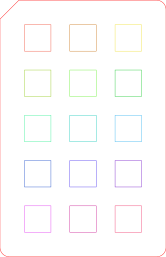
Yellow is your board 3 setting. The cut-off corner goes at the top left.
Rows are cut speed (top 5 mm/s, then 6, 7, 8, 10). Columns are power (left 70 %, middle 85 %, right 100 %). Every square is 1 pass with air assist. The top-right square (yellow in the picture) is the board 3 setting (100 %, 5 mm/s, 1 pass); every other square is gentler. The fastest, lowest-power square that still drops out cleanly wins.
Hold the card with the cut-off corner at the top left. Bambu Suite merges similar colours, so its colour chips can't pick out single squares. Each square's settings are written into the board's Bambu project by position when the board file is set up. The card outline is red and cuts with your normal settings.
| Where | Process | Power | Speed | Passes |
|---|---|---|---|---|
| Row 1, column 1 | Laser Cut | 70% | 5 mm/s | 1 |
| Row 1, column 2 | Laser Cut | 85% | 5 mm/s | 1 |
| Row 1, column 3 | Laser Cut | 100% | 5 mm/s | 1 |
| Row 2, column 1 | Laser Cut | 70% | 6 mm/s | 1 |
| Row 2, column 2 | Laser Cut | 85% | 6 mm/s | 1 |
| Row 2, column 3 | Laser Cut | 100% | 6 mm/s | 1 |
| Row 3, column 1 | Laser Cut | 70% | 7 mm/s | 1 |
| Row 3, column 2 | Laser Cut | 85% | 7 mm/s | 1 |
| Row 3, column 3 | Laser Cut | 100% | 7 mm/s | 1 |
| Row 4, column 1 | Laser Cut | 70% | 8 mm/s | 1 |
| Row 4, column 2 | Laser Cut | 85% | 8 mm/s | 1 |
| Row 4, column 3 | Laser Cut | 100% | 8 mm/s | 1 |
| Row 5, column 1 | Laser Cut | 70% | 10 mm/s | 1 |
| Row 5, column 2 | Laser Cut | 85% | 10 mm/s | 1 |
| Row 5, column 3 | Laser Cut | 100% | 10 mm/s | 1 |